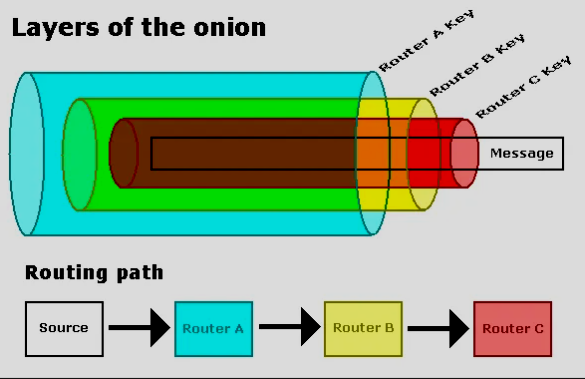
What is an onion domain?
So recently a friend told me one of his favorite websites went down. At some point he mentioned he was able to still access the service via TOR browser, using an onion domain.
We tend to stick into our browser (brave, iceweasel, firefox, edge) anything that resembles whateversite.com, whateversite.net, whateversite.io. It should work with whateversite.onion, right? Well, no, it does not. Try it yourself below.
Example .onion address of DuckDuckGo website: https://duckduckgogg42xjoc72x3sjasowoarfbgcmvfimaftt6twagswzczad.onion/
Then, how to use it? With Tor.
TOR: The Onion Router
The Onion Router is a software created by the Tor Project, which protects users from trackers and censorship by creating a network of volunteer supported servers that anonymizes client-server connections.
The network is a group of computers. A Tor client can choose a random path for each request, even if it’s for the same website. This way, any eavesdropper that snoops on a server, will not get full information but an often incomplete set of data.
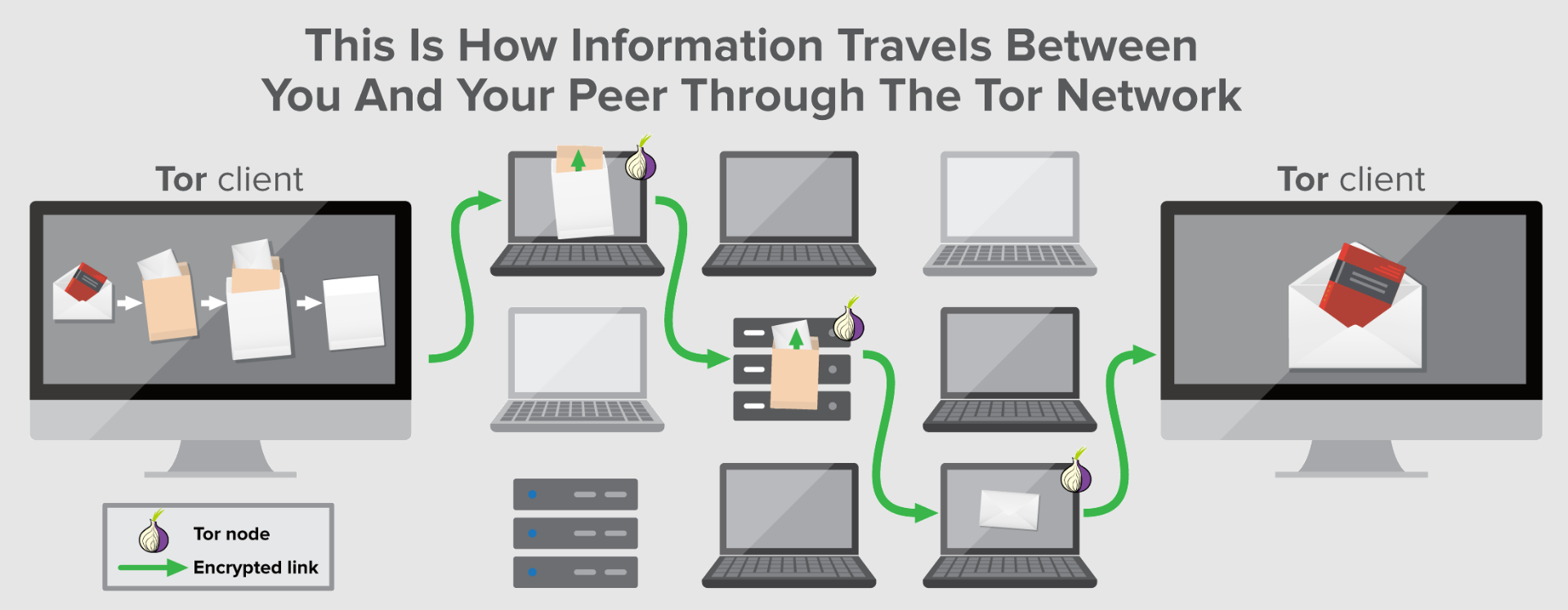
As described in the tor-spec:
Tor is a distributed overlay network designed to anonymize low-latency TCP-based applications such as web browsing, secure shell, and instant messaging. Clients choose a path through the network and build a circuit, in which each node […] in the path knows its predecessor and successor, but no other nodes in the circuit.
Simply put, Tor is a browser, capable of resolving .onion domains. And a “domain” is…
Domain Name System (DNS)
An IP (192.168.0.1) is like your home coordinates in latitude and longitude (9.9124181,-84.5320702). But IPs and coordinates are hard to remember, so we use words and names. To store this, we have dictionaries in the internet that translate domains to IPs just as we roughly translate addresses to coordinates.
domain            IP
mywebsite.com ==> 192.168.0.1

Address                                 Coordinates
Country, State, Neighborhood, House ~=> 9.9124181,-84.5320702
Whenever you input a website in your browser like https://cowsay.morecode.org/, your computer does not know where that is. But it asks somebody else. Your router, your Internet Service Provider (ISP), a Name Server (NS). One of them will tell them that https://cowsay.morecode.org/ is located in 192.168.0.1 or some IP. Then behind the scenes, your browser will go to that IP and retrieve a webpage. howdns.works has the best explanation of this process.
Whenever a browser reads something with suffix like .com, .net, .org, it interprets the string as a domain because these suffixes are Top Level Domains (TLD). Therefore they can be asked for in the DNS chain. More on this within the ICANN official site.
In short, DNS is a service in the internet, where browsers can ask and retrieve actual IPs to find websites.
.onion domains
An .onion domain is a TLD, that is not registered in the DNS chain (under ICANN control). Then, any common browser cannot find the computer address that provides the webpage behind the onion domain.
.onion domains are base32 encoded strings of 56 characters long. When decoded, they provide the onion service public key.
An onion service is any service offered via Tor
To access an onion service, the browser must be able to perform some extra steps before trying to connect to a webpage. The common set of steps are:
- User asks to access mywebsite.com
- Browser asks its router for the IP of mywebsite.com
- DNS resolves mywebsite.com to
192.168.0.2 - Browser connects to
192.168.0.2and asks forindex.htmlwebpage.
Very straightforward. However, real location of mywebsite.com is shared with user’s browser and unanonimous.
To connect to a server using an .onion domain, the browser must:
- Browser connects to Tor Network
- Browser picks a random Tor node (A) to find another Tor node (Z) that is able to retrieve website
https://mywebsitewzczad.onion/ - Choose a random path from Tor node (A) to node (Z), with a minimum of 3 hops for proper encryption layers (2.5).
- Browser waits for node (Z) random response path for a handshake*.
- Browser connects to Tor node (A) and waits for any required set of hops to happen before content of page
https://mywebsitewzczad.onion/is returned
handshake: mechanism designed so that two computers that want to pass information back and forth to each other can negotiate the parameters of the connection before transmitting data […].
If you notice, the browser never knows the IP of the server behind https://mywebsitewzczad.onion/, which is appropriately hidden by Tor network with Hidden Service Descriptors (2.) (a folder with server IP). It’s almost as if the Tor browser requires extra steps for “DNS resolve”, which browsers usually do not include, but simply delegate. Advanced details of how the onion service IP is actually stored, here. This process is well explained in the tor rendezvouz specification, section “1.1. View from 10,000 feet”.
Takeaway
You now know what an .onion domain is and how to use it.
Why would you?
- Full anonimity when browsing the web
- Some firewalls bypassing
- Fight censorship under strong media controlling regimes
My friend here simply wanted to read and learn more.